ARM (Advanced RISC Machine) microcontroller is a low power device that power most of mobile electronic device today. Many portable devices such as an electronic test equipment, home appliance and many other industrial control system have an ARM embedded inside.
Comparing to 8/16-bit microcontroller, the price of ARM chips cost nearly the same, but it superb in performance. The cost per unit may drop lower than the 8-bit one in a bulk purchase.
ARM holding has been release many versions of ARM-based microcontroller, a well known device for electronic designs and hobbyists are Cortex-M3 and M4. These devices was widely available from ST.
Generally, a microcontroller programming require an ISP (In System Programming) to upload and debug the target device. It requires an external ISP adapter. The adapter may cost differently in price depending on the vendor of selected device. However, most of microcontroller from NXP shipped with a bootloader inside the chip. It allow the users to upload the firmware to the target chip without any extra external ISP adapter. The bootloader itself require only one UART Tx/Rx pair with a PC software to control the flow.
A finished PCB assembling with fully tested on top side
The NXP LPC1114 ARM Cortex-M0
LPC1114 is a 32-bit ARM Cortex-M0 microcontroller from NXP. It's one of its family LPC111X series.
These devices are low power with simple instruction to program.
The system performance could clock up to 50 MHz, with nested interrupt vector. Its timer could create a timer tick enable the implementation of multitasking.
A few of LPC1114DB48/302 I bought from futurlec. It costs near 1$ each exclude shipping.
For LPC1114DB48/302 as listed here, the program memory is 32 kB with 8 kB of SRAM.
I don't list the full specifications here as per in its datasheet. The device I showed above is a 48-pin SMD device. One thing to remember is it's ISP able with its bootloader inside via UART communication.
Other remaining features will be posted in the next related topics.
Designing And Building An LPC1114 Experimental Board
System Programming And Simulation In Software
With the ease of device library and simulation model came with Proteus VSM, I have made a start up programming for this device using KEIL for ARM. At that time, I am aware of burning a few chips a bought. Hence, I simulate the program and circuit in Proteus software.
A simple program simulation to read a digital GPIO input output This is a sample program I learned from Digi-Key tutorials. I tried to program and made my own experiments.
Making An SMD Socket Adapter
After a few test, I decide to make my own SMD chip adapter pinned on a breadboard. It this aids I can upload the program and built a test circuit on a breadboard.
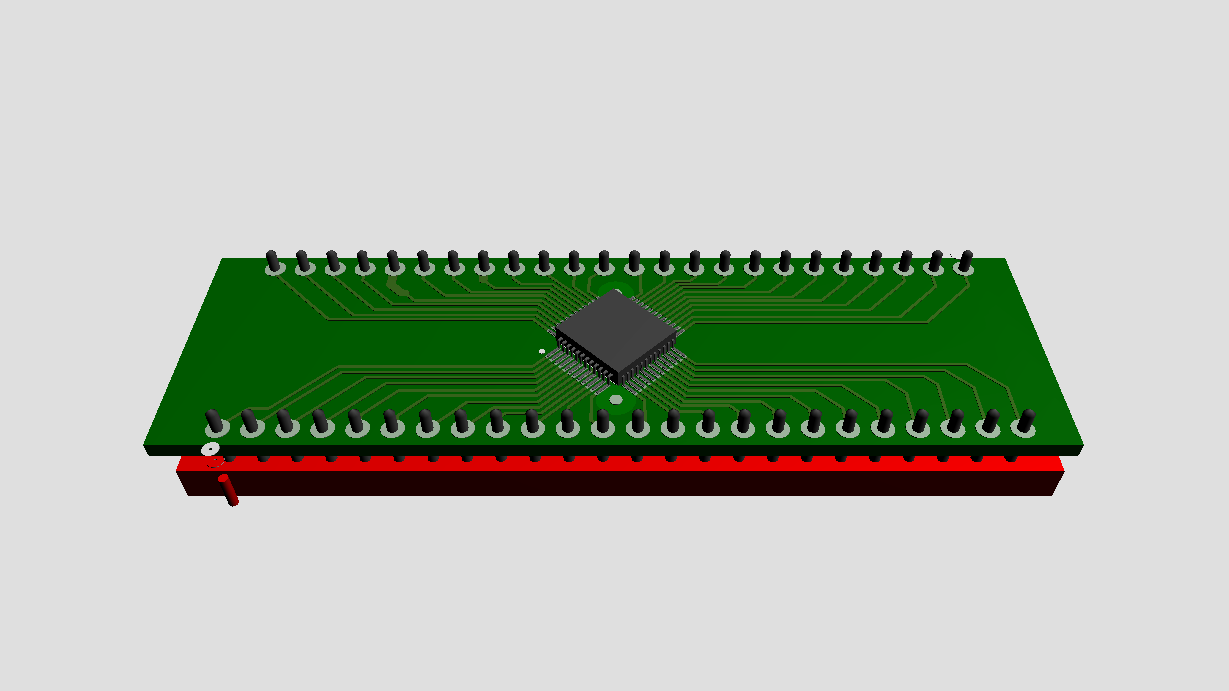
LPC1114DB48/302 SMD Socket Adapter, designed to fit the breadboard prototyping.
A PCB Design View
Copper Soldering Side For SMD
The SMD adapter for this device had solder and tested on board without error, but I didn't take any photo from that workshop. I have make a program upload using flash magic and did a prototyping for a sample program list above on a breadboard.
I have design a experimental board for my personal use. It has a lot of system connection on-board.
A regulated +3.3 V DC supply - due to +3.3 V working voltage limit for this device
A USB-Serial converter block powered by CH340G used for ISP programming, and for bus powering.
Two digital input switches to test the digital input pin
An LED to test a digital output pin
A hard reset circuit block
Two analog input - A 10 kOhm Pot and an LM35 analog temperature sensor
Two I2C device - A ds1307 RTC and a 24C16 EEPROM.
An SPI header output for driving a Nokia 5110 GLCD.
One 1-wire header to read an external 1-wire device.
The MCU socket for LPC1114DB48/302 clocks with a 8 MHz crystal
The full schematic and PCB design made with Proteus. Most of the on-board peripheral have tested while other are not yet finished. However, this board is fully work.
Schematic for experimental board
PCB View
A 3D View Of This Board
Copper Side
Top Silk
I made this board with my in-house facilities. The copper pattern is made by UV dry film method with a silk screened UV solder mask ink.
Copper Side With Solder Mask
The components side printed with component legends with a silk screened UV white solder mask ink.
Components side with legends printing
This board is an FR-4 material. I bought a sheet of an A4 size for only 2 $ from a local electronic components store.
A finished PCB assembling with fully tested on top side
Soldering side with a corrected mistake
On the copper soldering side, there is a minor mistake related to CH340G supply pins. I corrected it to work correctly. In the schematic shown above, I did correct the circuit connection and there's no mistake again.
Click here if you wish to download the complete archive.
An electro-mechanical relay module board is widely available from any online store. It costs around 1 US Dollars. The working voltage ranges from 3.3 V to 24 V. For Arduino users, a 3.3 V or a 5 V relay relay module are very popular due to a USB-powered bus, during the prototyping. However, a lower voltage rating of a relay draws a higher current.
A four-channel relay module board I ordered from an on line store. The working voltage is 5 V.
A single pole dual throws (SPDT) relay is very popular over the other contact typologies. This kind of relay comes with 5 pins.
Designing A Relay Module Board
Using my own existing components in-stock with an in-house PCB prototyping, making a DIY relay module board is very straight forward. For a few requirements, all components are solder on a strip board without the circuit and PCB design.
For a long term design requirements, I use an EDA tool to design the circuit and PCB. The PCB are made from copper clad board with the etching process.
Schematic Diagram, The relay is selected to work with 12 V DC due to a high power requirement.
A sample of completed PCB design
Copper track at the bottom
Top silk of the components legend
A 3D Model renders by the Software.
Component Side
Copper Side
Click here to download the complete design file in Proteus 8.
In an earlier post, I use NE555 to blink a two-color big LED. Now I use the basic building block used in that post to make a slow variable clock source that fed to a CMOS counter CD4017.
In digital circuit terminology, CD4017 is considered as a counter or a frequency divider for digital circuit, or a micro-processor. In every day usage especially for an electronic hobbyist and LED lighting, this IC is widely use for LED chasing due to its easy to use, without any programming.
These PCBs soldering, I made for a high school technical electronics class a year a go.
Copper soldering sides, I coat them with clear acrylic paint to protect them from corrosion and a little shorted circuit.
Last year I made these simple electronics stuffs to attract high school student in studying with technical electronic class. They work well without errors.
I bought a few 4017 devices from online store for my personal use. The device typically supplied at 5 V for hobbyist prototyping.
A pair of CD4017 at my workshop
Pin Diagram from Fairchild device datasheet.
Timing diagram. The outputs is chased gradually due to the number of clock pulses.
Schematic And PCB Design Of CD4017 LED Chasing
I make a circuit drawing and simulation in the simulator. So it's ready to draw the schematic diagram and PCB design for outside use.
Schematic Diagram
U1 make a clock pulse fed to the CLK pin of CD4017. The clock pulse varies in a range of milli seconds by adjusting to POT RV1.
The system is regulated by 7805 +5 V voltage regulator. From Q0 to Q9 are the ten counting output while CO is the overflow flag. It's set whenever the over-lap of Q9 counting is made.